Updated September 8, 2026
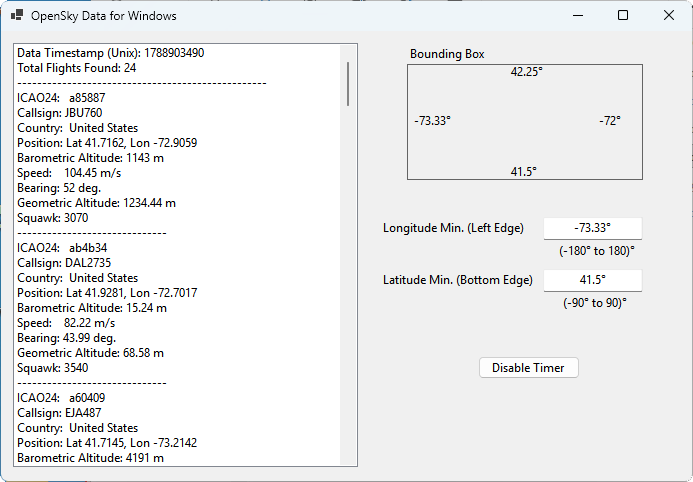
After searching for a example using the OpenSky Network to track flights in Windows using a program built with VB.NET, I became aware that none of what was available was a “complete” working solution. I believe there were five or six partial solutions which gave hints as to what was required. This full VB.NET solution, while a bit short on the features of much larger viewers, works to present the basic data for flights within a user-defined bounding box, updated every 15 seconds. The features available within this example are:
- A default bounding box centered on Springfield, Massachussetts. Its 16:9 aspect ratio include Windsor, CT to the south, Northampton, MA to the south, Stockbridge, MA to the west, and Spencer, MA to the east.
- The bounding box coordinates can be modified by changing the minimum longitude (the westerly edge) and the minimum latitude (the southerly edge). The easterly and northerly edges are then calculated to maintain the 16:9 aspect ratio.
- A timer set for 15 seconds refreshes the flight list. If there are no flights within the bounding box coordinates, a message in the listbox says so. Refreshing, however, will continue every 15 seconds.
- A button will disable the timer so the flight list can be examined. The same button can then be used to re-enable the timer.
Bounding box coordinates for a certain area can be found using the tool at: https://boundingbox.klokantech.com/
The real meat of this solution is in module 1, which is listed below. This uses the OAuth2 authorization method which is now used by OpenSky effective March 2026. This code also includes necessary error handling for times when no flights are within the defined bounding box.
' OpenSky flight tracker example for VB.NET
' Dave Liske
' September 8, 2026
' http://www.cuisinology.com
'
' As of March 2026, the OpenSky Network deprecated old username/password basic authentication.
' All authenticated programmatic access must now request a short-lived OAuth2 Access Token from OpenSky's Keycloak authorization server.

Imports System.Net.Http
Imports System.Net.Http.Headers
Imports Newtonsoft.Json.Linq

Module Module1

    ' To use the OpenSky Network, go to https://opensky-network.org/ and click Sign In at the top right.
    ' Follow the instructions there to create an account to retrieve a clientid and clientsecret.
    Private Const ClientId As String = "lunapiercook-api-client"
    Private Const ClientSecret As String = "5VyyUexkHDrE9TiklTkP8kNaHEFrlqzC"
    Private Const TokenUrl As String = "https://auth.opensky-network.org/auth/realms/opensky-network/protocol/openid-connect/token"

    Public Async Sub GetOpenSkyDataAsync()

        Form1.ListBox1.Items.Clear()

        Using client As New HttpClient()
            Try
                ' Fetch the OAuth2 Access Token
                Dim accessToken As String = Await GetAccessTokenAsync(client)
                If String.IsNullOrEmpty(accessToken) Then
                    Form1.ListBox1.Items.Add($"Failed to retrieve access token.")
                    Return
                End If

                ' Configure the HTTP client to use the Bearer Token
                client.DefaultRequestHeaders.Authorization = New AuthenticationHeaderValue("Bearer", accessToken)

                ' read the current bounding box from the labels, removing the degree character
                Dim lonmin As String = Form1.LongMinLabel.Text
                Dim lonmax As String = Form1.LongMaxLabel.Text
                Dim latmin As String = Form1.LatMinLabel.Text
                Dim latmax As String = Form1.LatMaxLabel.Text

                Dim lon_min As String = lonmin.TrimEnd("°"c)
                Dim lon_max As String = lonmax.TrimEnd("°"c)
                Dim lat_min As String = latmin.TrimEnd("°"c)
                Dim lat_max As String = latmax.TrimEnd("°"c)

                ' OpenSky REST API endpoint for all current aircraft states within the bounding box
                Dim apiUrl As String = "https://opensky-network.org/api/states/all?lamin=" & lat_min & "&lamax=" & lat_max & "&lomin=" & lon_min & "&lomax=" & lon_max

                ' Send GET request asynchronously
                Dim response As HttpResponseMessage = Await client.GetAsync(apiUrl)

                If response.IsSuccessStatusCode Then
                    Try
                        ' Read the JSON response string
                        Dim jsonResult As String = response.Content.ReadAsStringAsync().Result

                    ' Parse the JSON string
                    Dim apiData As JObject = JObject.Parse(jsonResult)
                    Dim timestamp As Long = CType(apiData("time"), Long)

                    Dim statesArray As JArray = CType(apiData("states"), JArray)

                    Form1.ListBox1.Items.Add($"Data Timestamp (Unix): {timestamp}")
                    Form1.ListBox1.Items.Add($"Total Flights Found: {statesArray.Count}")
                    Form1.ListBox1.Items.Add(New String("-"c, 50))

                        ' Loop through the aircraft
                        For i As Integer = 0 To (statesArray.Count) - 1
                            Dim flight As JArray = CType(statesArray(i), JArray)

                            ' Available states and data types
                            ' Index   Property		    Type
                            ' 0       icao24			string
                            ' 1       callsign		    string
                            ' 2       origin_country	string
                            ' 3       time_position	    int
                            ' 4       last_contact	    int
                            ' 5       longitude		    float
                            ' 6       latitude		    float
                            ' 7       baro_altitude(m)  float
                            ' 8       on_ground 		boolean
                            ' 9       velocity (m/s)	float
                            ' 10      true_track (deg)  float
                            ' 11      vertical_rate	    float
                            ' 12      sensors			int[]
                            ' 13      geo_altitude	    float
                            ' 14      squawk			string

                            ' OpenSky states returns arrays where indexes represent specific values
                            Dim icao24 As String = flight(0).ToString()
                            Dim callsign As String = flight(1).ToString().Trim()
                            Dim country As String = flight(2).ToString()
                            Dim longitude As String = If(flight(5) IsNot Nothing, flight(5).ToString(), "N/A")
                            Dim latitude As String = If(flight(6) IsNot Nothing, flight(6).ToString(), "N/A")
                            Dim baroaltitude As String = If(flight(7) IsNot Nothing, flight(7).ToString(), "N/A")
                            Dim velocity As String = If(flight(9) IsNot Nothing, flight(9).ToString() & " m/s", "N/A")
                            Dim truetrack As String = If(flight(10) IsNot Nothing, flight(10).ToString(), "N/A")
                            Dim geoaltitude As String = If(flight(13) IsNot Nothing, flight(13).ToString(), "N/A")
                            Dim squawk As String = flight(14).ToString()

                            Form1.ListBox1.Items.Add($"ICAO24:   {icao24}")
                            Form1.ListBox1.Items.Add($"Callsign: {callsign}")
                            Form1.ListBox1.Items.Add($"Country:  {country}")
                            Form1.ListBox1.Items.Add($"Position: Lat {latitude}, Lon {longitude}")
                            Form1.ListBox1.Items.Add($"Barometric Altitude: {baroaltitude} m")
                            Form1.ListBox1.Items.Add($"Speed:    {velocity}")
                            Form1.ListBox1.Items.Add($"Bearing: {truetrack} deg.")
                            Form1.ListBox1.Items.Add($"Geometric Altitude: {geoaltitude} m")
                            Form1.ListBox1.Items.Add($"Squawk: {squawk}")
                            Form1.ListBox1.Items.Add(New String("-"c, 30))

                        Next

                    Catch ex As Exception
                        ' Form1.ListBox1.Items.Add($"An error occurred: {ex.Message}")
                        Form1.ListBox1.Items.Add($"Total Flights Found: 0")
                        Form1.ListBox1.Items.Add($"Recommend moving the bounding box edges.")
                    End Try
                Else
                    ' Form1.ListBox1.Items.Add($"API Request failed: {response.StatusCode} - {response.ReasonPhrase}")
                    Form1.ListBox1.Items.Add($"Total Flights Found: 0")
                    Form1.ListBox1.Items.Add($"Recommend moving the bounding box edges.")
                End If

            Catch ex As Exception
                Form1.ListBox1.Items.Add($"An error occurred: {ex.Message}")
            End Try
        End Using

    End Sub

    Private Async Function GetAccessTokenAsync(client As HttpClient) As Task(Of String)
        Try
            ' Set up the form parameters required for OAuth2 Client Credentials flow
            ' "grant_type" and "client_credentials" only need to be changed for higher levels within Opensky
            Dim tokenRequestData As New List(Of KeyValuePair(Of String, String)) From {
            New KeyValuePair(Of String, String)("grant_type", "client_credentials"),
            New KeyValuePair(Of String, String)("client_id", ClientId),
            New KeyValuePair(Of String, String)("client_secret", ClientSecret)}

            Dim requestContent As New FormUrlEncodedContent(tokenRequestData)
            Dim response As HttpResponseMessage = Await client.PostAsync(TokenUrl, requestContent)

            If response.IsSuccessStatusCode Then
                Dim jsonResponse As String = Await response.Content.ReadAsStringAsync()
                Dim jsonObjects As JObject = JObject.Parse(jsonResponse)

                ' Extract and return the access token
                Return jsonObjects("access_token")?.ToString()
            Else
                Return Nothing
            End If

        Catch ex As Exception
            ' Form1.ListBox1.Items.Add($"An error occurred: {ex.Message}")
            Form1.ListBox1.Items.Add($"Total Flights Found: 0")
            Form1.ListBox1.Items.Add($"Recommend moving the bounding box edges.")
        End Try

    End Function

End Module